PURPLEMODE
APPLE - PurpleMode (Change SN)
PurpleMode Serial Number change and SysCFG management for Apple devices.
PURPLEMODE (CHANGE SN)
- PURPLEMODE (CHANGE SN)
How to Change Serial Number and manage SysCFG on Apple devices ?
Created: 2026-08-17 14:45:00
Warning
Device must be in DFU mode before starting. Use with caution — incorrect SysCFG writes can brick the device.
Step 1 — Pwn/Exploit
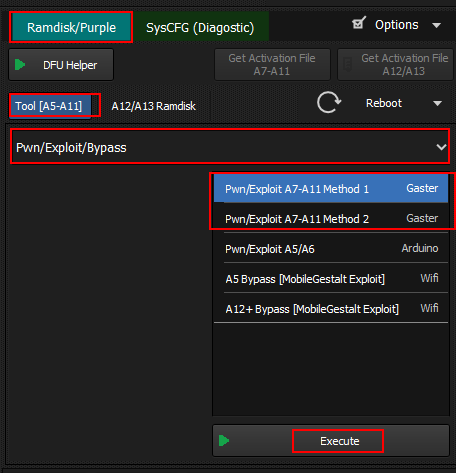
- Open Hydra Tool
- Open Apple Module
- Go to Options tab
- Select Pwn/Exploit method based on your device:
- Gaster — A12/A13 devices
- Pwn/Exploit A7-A11 Method 1 — A7 to A11
- Pwn/Exploit A7-A11 Method 2 — Alternative for A7-A11
- Pwn/Exploit A5/A6 — A5 and A6 devices
- Click Execute
Step 2 — Start Ramdisk
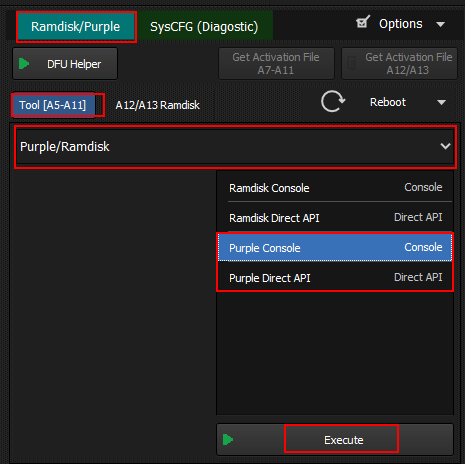
- Switch to Ramdisk/Purple tab
- Select Ramdisk Console
- Click Execute
- Wait until status shows Ramdisk Running
Step 3 — SysCFG Management
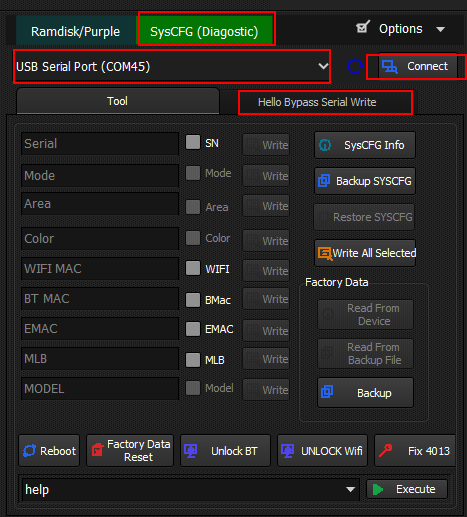
- Connect device via USB Serial Port
- Click Connect
- Go to Hello Bypass Serial Write section
- Select and write SysCFG data:
- Serial (SN) — Write serial number
- Mode — Write mode
- Area — Write area
- Color — Write color
- WIFI MAC — Write WiFi MAC address
- BT MAC — Write Bluetooth MAC address
- EMAC — Write Ethernet MAC
- MLB — Write MLB serial
- Model — Write model number
- Use Backup SYSCFG to save current data before changes
- Use Restore SYSCFG to restore from backup
- Additional options:
- Factory Data — Reset factory data
- Reboot — Reboot device
- Unlock BT — Unlock Bluetooth
- UNLOCK Wifi — Unlock WiFi
- Fix 4013 — Fix error 4013
- Reset — Full reset
- Click Execute
Navigate back to Apple devices or All supported devices