MOTOROLA
MOTOROLA - Qualcomm Devices
Qualcomm-powered Motorola devices.
WRITE FIRMWARE
- WRITE FIRMWARE
How to Write Motorola XML Firmware by Fastboot?
Created: 2023-05-13 14:19:02
- Set your device to "fastboot mode", For this, check the title "How Set Fastboot Mode?"
- Run Hydra "Main Module", At the Top Right Select Platform as "Motorola"
- Select Mode: Fastboot
- Go to Flashing Tab, Select "XML Firmware"
- Tick "Auto Reboot", and Click "Start Flash [Fastboot] Button."
- Good Luck!
FACTORY RESET [FORMAT]
- FACTORY RESET [FORMAT]
How to Format Motorola by Fastboot Mode?
Created: 2023-05-13 14:18:05
- Set your device to fastboot mode, For set fastboot mode you can check the title "How Set Fastboot Mode ?"
- Run Hydra Main Module, From Top Right Select Platform: Motorola
- Select Mode: Fastboot
- Go to Service Tab, Tick Factory Reset / Format
- Tick Auto Reboot, and Click Execute
CONNECTION
- CONNECTION
How to Connect Motorola in Fastboot Mode?
Created: 2023-05-13 14:20:00
- Power off your Motorola device.
- Press and hold Volume Down + Power button together.
- Connect your device to PC using USB cable.
- Device will show 'Fastboot Mode' screen.
RESET FRP
- RESET FRP
How to Remove FRP on Motorola by Fastboot?
Created: 2023-05-13 14:22:10
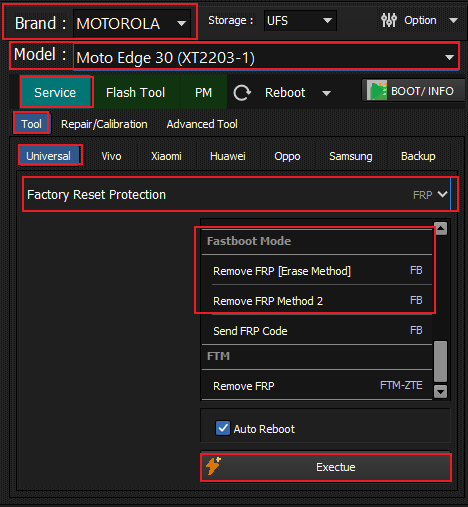
- Set your device to fastboot mode.
- Run Hydra Main Module, select Platform: Motorola.
- Go to FRP Tab, select 'Remove FRP'.
- Click Execute and wait for the process to finish.
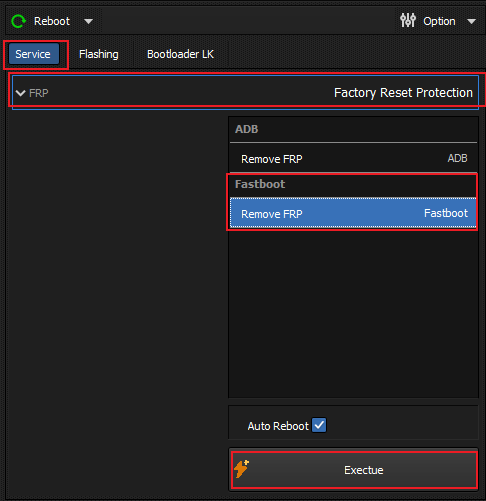
For the MOTO Module variant, open the MOTO Module, go to the Service tab, select FRP / Factory Reset Protection and pick the ADB or Fastboot remove method, then click Exectue and wait for the process to finish.
UNLOCK BOOTLOADER
- UNLOCK BOOTLOADER
How to Unlock Bootloader on Motorola?
Created: 2023-05-13 14:25:30
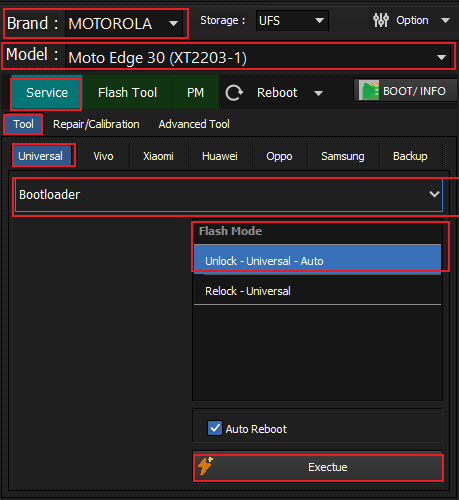
- Set your device to fastboot mode.
- Run Hydra Main Module, select Platform: Motorola.
- Go to Bootloader Tab, select 'Unlock Bootloader'.
- Click Execute and follow on-screen instructions.
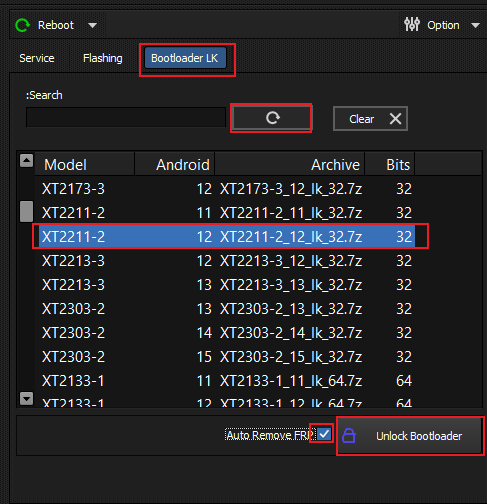
Alternatively, use the MOTO Module's Bootloader LK tab: enable Auto Remove FRP, click Unlock Bootloader and wait for the operation to finish. Supported bootloader archives are listed for each model in the table.