SAMSUNG
SAMSUNG - Qualcomm (Snapdragon) Devices
Qualcomm Snapdragon-powered Samsung devices.
RESET FRP
- RESET FRP
FRP Remove method for Samsung New Qualcomm Devices
Created: 2023-11-08 22:07:58
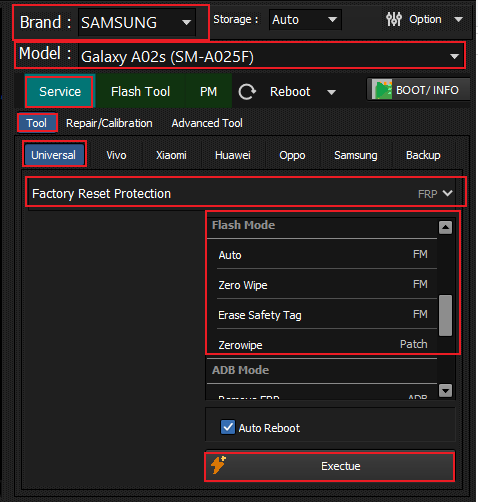
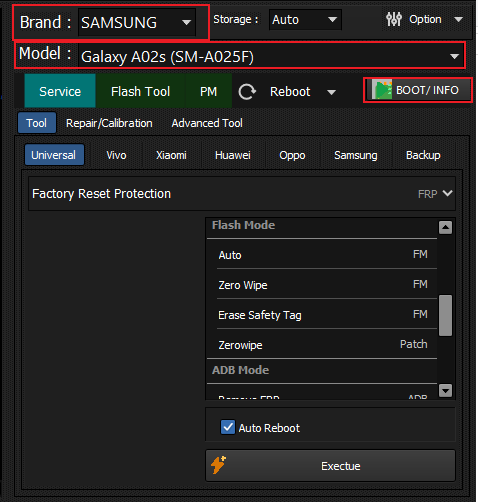
- Open Qualcomm Module.
- Select brand and model
- In Service Tab select Factory reset protection from drop down menu.
- Select zero wipe patch method and click execute.
- Connect device in edl mode and wait for the operation to finish.
Note: You can connect in edl using EDL v1 cable or Hero-Key hardware.
SIM UNLOCK
- SIM UNLOCK
How to Remove Network Lock for Samsung JDM Models?
Created: 2023-11-08 22:07:58
- Connect device in ADB mode.
- Open Hydra tool Samsung Module and Select SimLock Security from drop down menu in Service tab.
- Click Execute and Allow adb authorisation on device.
FACTORY RESET [FORMAT]
- FACTORY RESET [FORMAT]
How to factory reset Samsung Qualcomm device?
Created: 2023-11-08 22:07:58
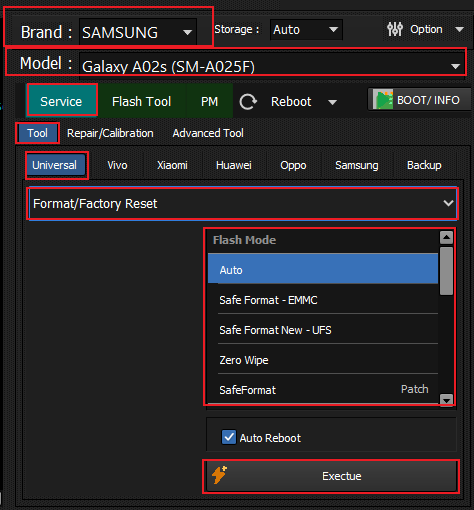
- Open Qualcomm Module.
- Select brand and model.
- In Service Tab select Format/Factory Reset from drop down menu.
- Select Safe Format - EMMC or Safe Format New - UFS method depending on device storage.
- Click execute and connect device in EDL mode, wait for the operation to finish.
MDM REMOVE
- MDM Remove
How to remove MDM Lock of Samsung Qualcomm device?
Created: 2023-11-08 22:07:58
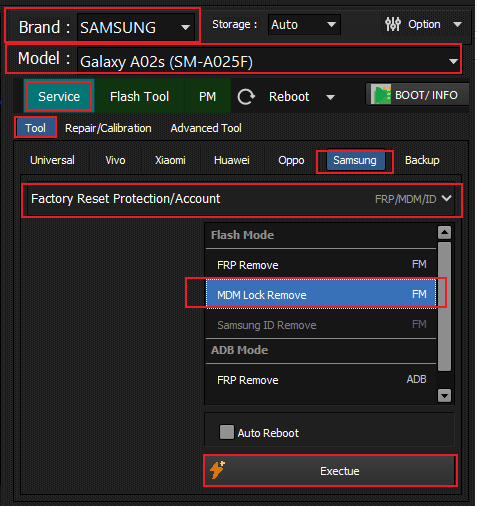
- Open Qualcomm Module.
- Select brand and model.
- In Service Tab select Factory Reset Protection/Account from drop down menu.
- Select MDM Lock Remove method from FRP/MDM/ID section.
- Click execute and connect device in EDL mode, wait for the operation to finish.
SUPPORTED MODELS
- SUPPORTED MODELS
Coming Soon
Device models and support information will be added here.
INSTALLATION GUIDE
- INSTALLATION GUIDE
Installation Steps
Installation instructions for Samsung Snapdragon devices will be provided here.
Navigate back to Qualcomm devices or All supported devices