SAMSUNG
SAMSUNG - MediaTek Devices
MediaTek-powered Samsung devices.
RESET FRP
- RESET FRP
Samsung MTK 2023 patch FRP Removal
Created: 2024-05-05 05:11:15
Samsung MTK 2023 patch FRP Removal Process.
Note
There is no need to select model just follow the picture.
Warning
KG locked devices are not supported. Also the SEC CRTL STATUS 0 devices users can try at their own risk.
Samsung MTK FRP Lock Remove in Brom/Preloader Mode
Created: 2026-08-15 13:19:17
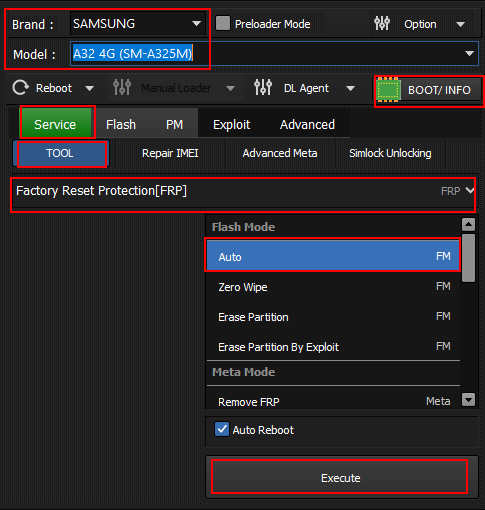
- Run Hydra MTK Module.
- Select Model and Brand.
- Click Boot Info connect phone with brom/preloader mode.
- Select Tab Service and go to Tool.
- Select Factory Reset Protection [FRP] Auto.
- Click Execute Button.
Samsung MTK 2023 patch FRP Removal in Download Mode
Created: 2026-08-23 00:00:00
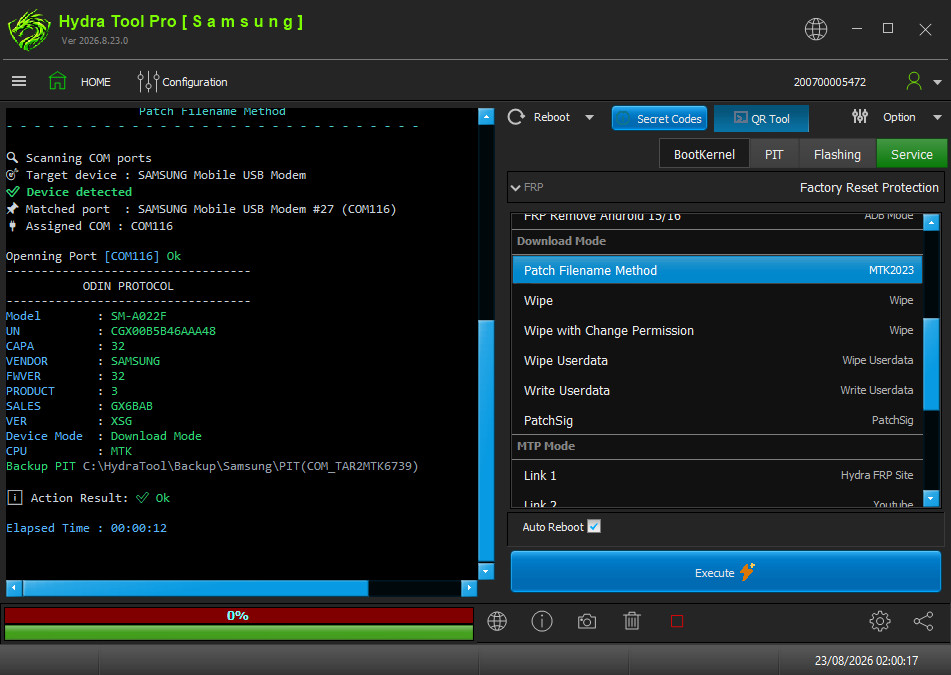
- Run Hydra MTK Module.
- Go to Service Tab and Select Factory Reset Protection (FRP).
- Go to Download Mode Tab.
- Select Patch Filename Method (MTK2023).
- Click Execute Button.
Note
Phone must be already connected in Download Mode. Phone will reboot to Download Mode during the process — do not disconnect the cable.
FRP Remove by Modem Mode (MTP) - Offline Method
Created: 2026-08-24 00:00:00
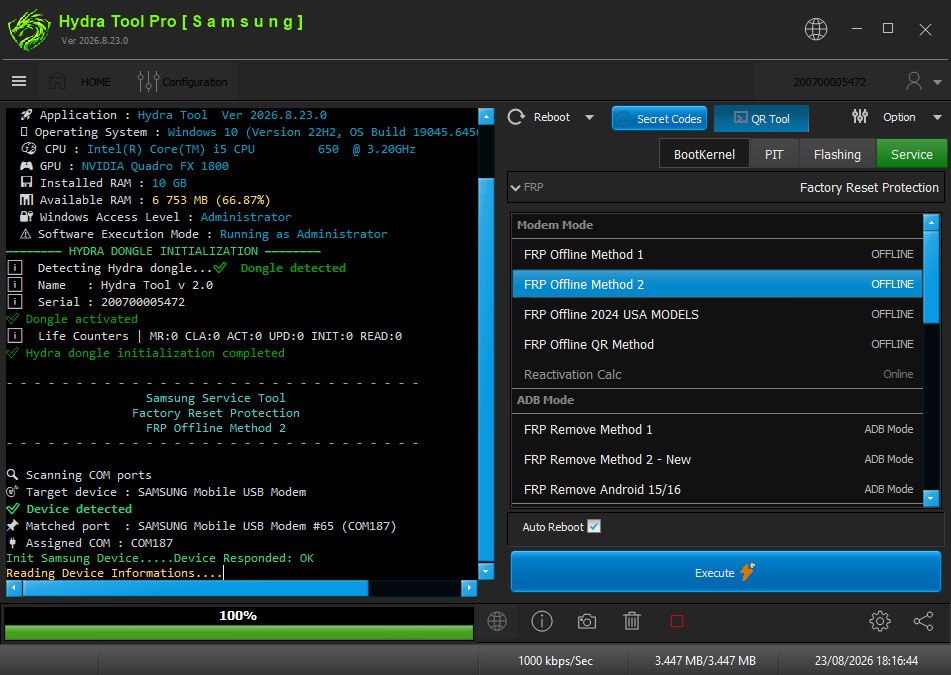
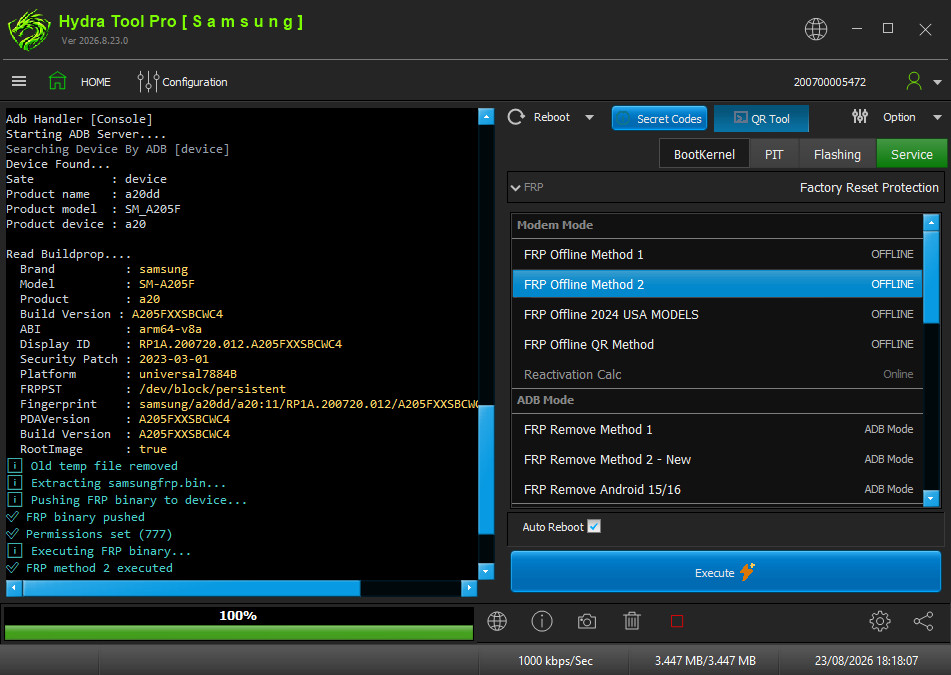
- Run Samsung Module.
- Go To Service Tab and Select Factory Reset Protection (FRP).
- Go to Modem Mode Tab.
- Select FRP Offline Method 1 or 2.
- Click Execute.
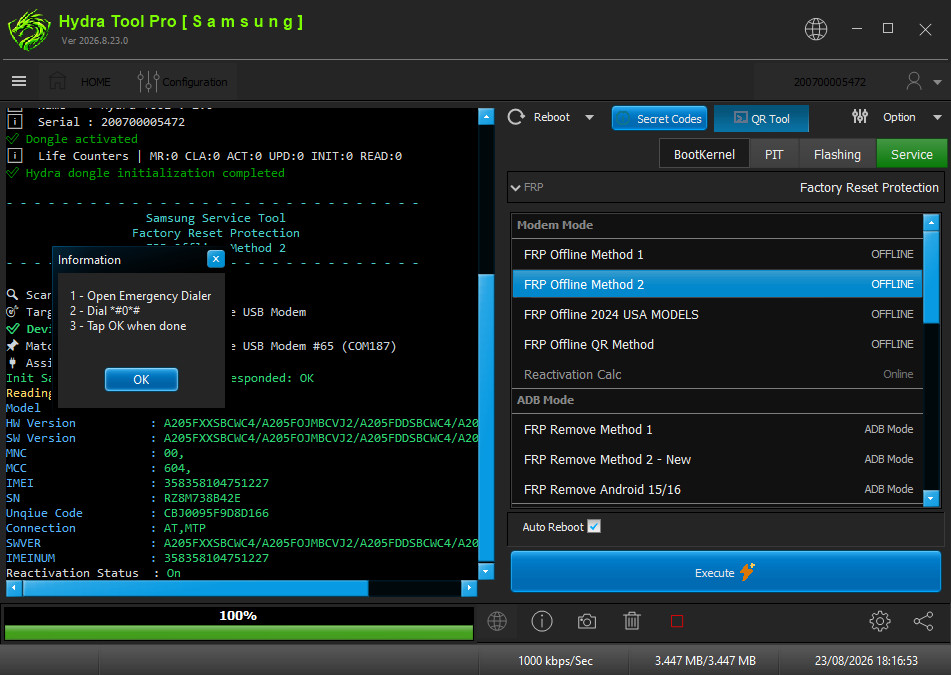
- Click Ok after doing TEST Mode Code (*#0*#) in Dialer Phone.
- Click Enable Authorise Adb mode in phone.
UNLOCK BOOTLOADER
- UNLOCK BOOTLOADER
How to Unlock Bootloader in flash mode ? (Brom/Preloader mode)
Created: 2026-08-15 10:48:00
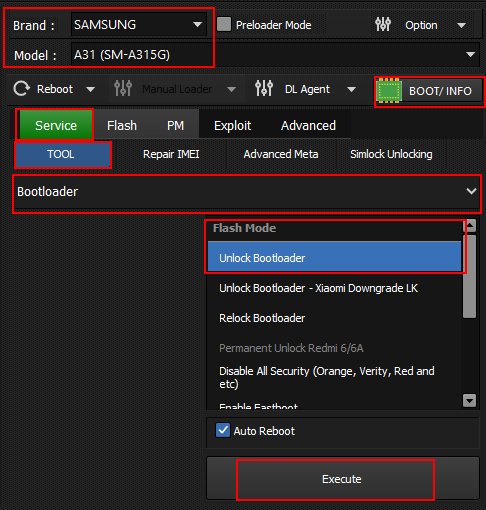
- Run Hydra MTK Module.
- Select Model and Brand.
- Click Boot Info connect phone with brom/preloader mode. (Never disconnect phone after boot info.)
- Select Tab Service and go to Tool.
- Select Bootloader And Select Unlock Bootloader.
- Click Execute Button.
FACTORY RESET [FORMAT]
- FACTORY RESET [FORMAT]
How to Factory Reset in flash mode ? (Brom/Preloader mode)
Created: 2026-08-15 13:19:17
![Samsung Factory Reset [Format]](../../../static/SW/samsung-factory-reset.png)
- Run Hydra MTK Module
- Select Model and Brand
- Click Boot Info connect phone with brom/prelaoder mode(Never disconnect phone after boot info)
- Select Tab Service and go to Tool
- Select Format/Factory Reset/Screen Lock and Select Auto
- Click Execute Button
WRITE FIRMWARE
- WRITE FIRMWARE
How to Write Firmware in flash mode ? (Brom/Preloader mode)
Created: 2026-08-15 13:19:17
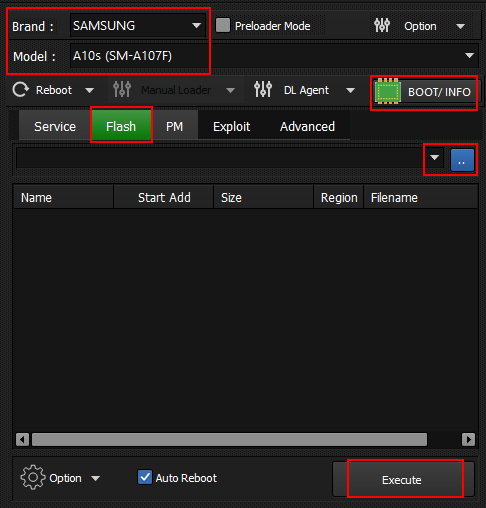
- Run Hydra MTK Module
- Select Model and Brand
- Click Boot Info connect phone with brom/prelaoder mode(Never disconnect phone after boot info)
- Select Tab Flash
- Select Firmware [Scatter File]
- Click Execute Button
KG LOCK
- KG LOCK
How to remove KG Lock ? (Brom/Preloader mode)
Created: 2026-08-15 13:19:17
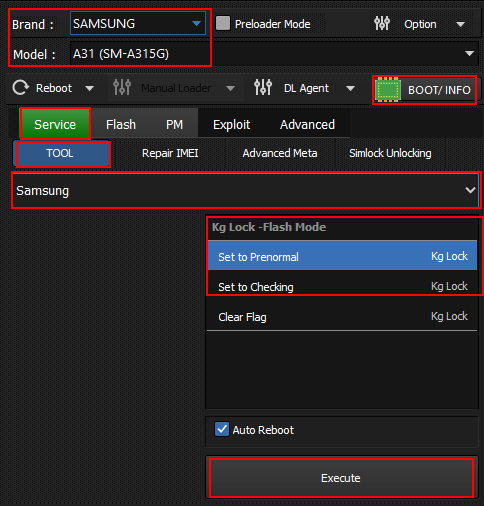
- Run Hydra MTK Module
- Select Model and Brand
- Click Boot Info connect phone with brom/prelaoder mode(Never disconnect phone after boot info)
- Select Tab Service and go to Tool
- Select Samsung Option And Select KG Lock Options
- Click Execute Button
How to remove KG Lock in Flash Mode? (Samsung MTK)
Created: 2026-09-30 12:00:00
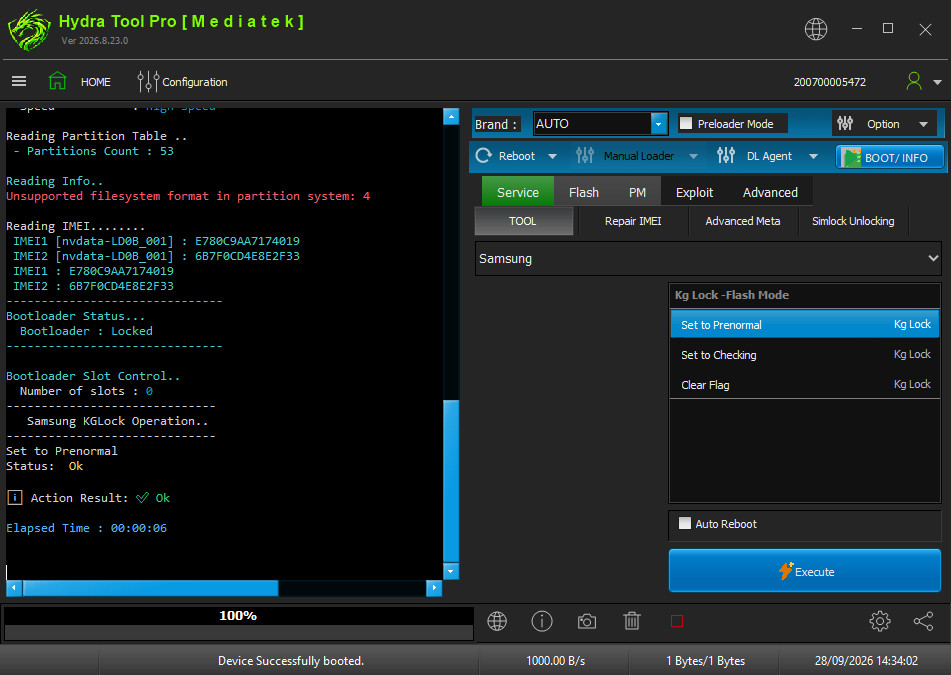
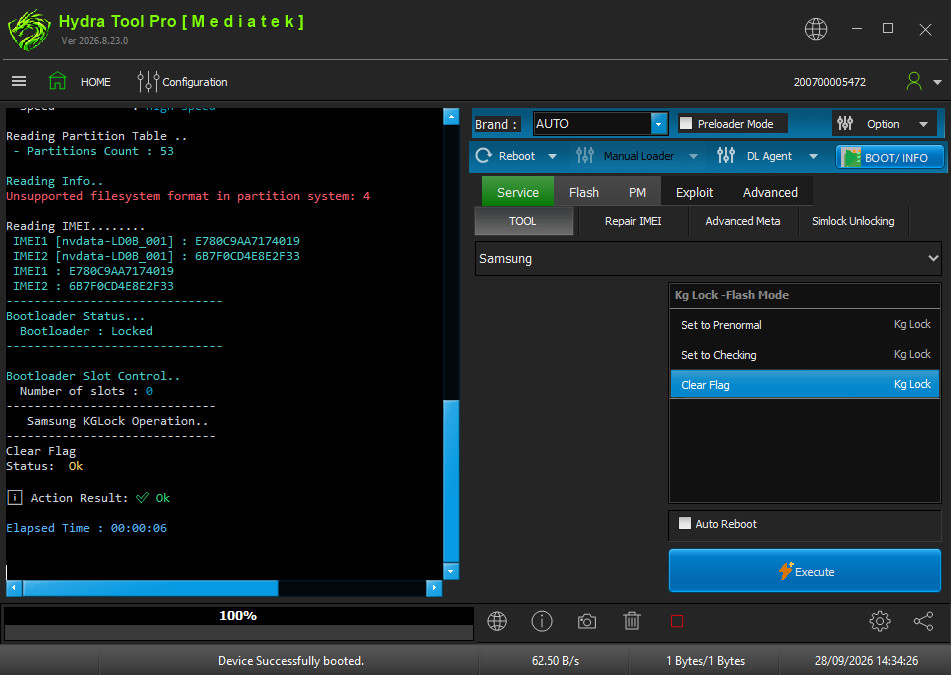
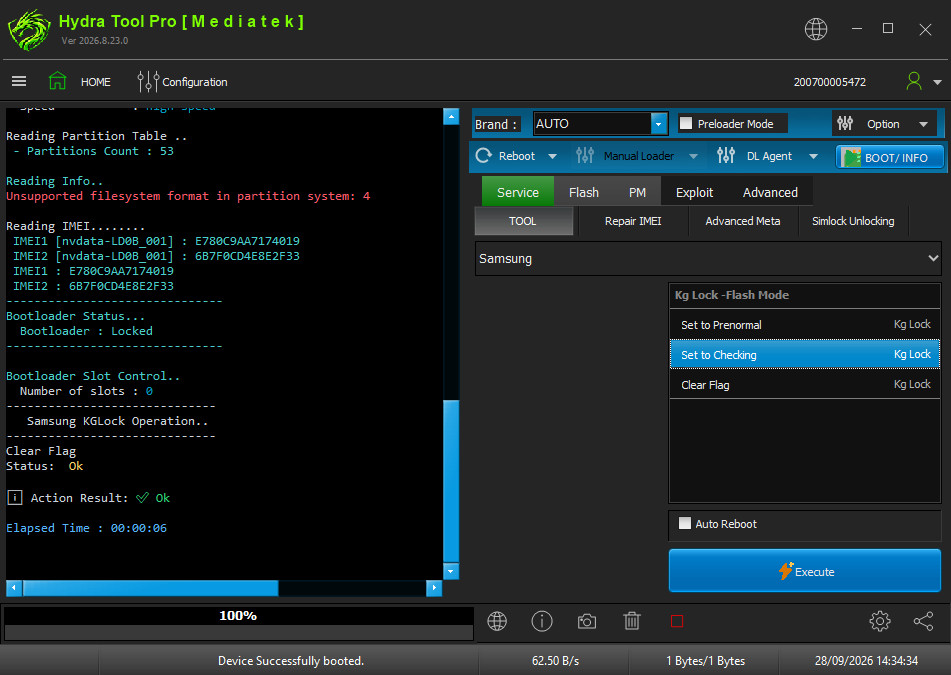
- Open Hydra Tool, go to MediaTek module.
- Click KG LOCK under the functions list.
- Select Brand Samsung, and your Samsung model.
- Connect the phone in Flash mode (Brom/Preloader).
- Click Execute to start the KG Lock removal.
- Wait for Status: ok message.
- Disconnect and power on the phone.
READ FIRMWARE BACKUP
- READ FIRMWARE BACKUP
How to Read Firmware Backup in flash mode ? (Brom/Preloader mode)
Created: 2026-08-15 13:19:17
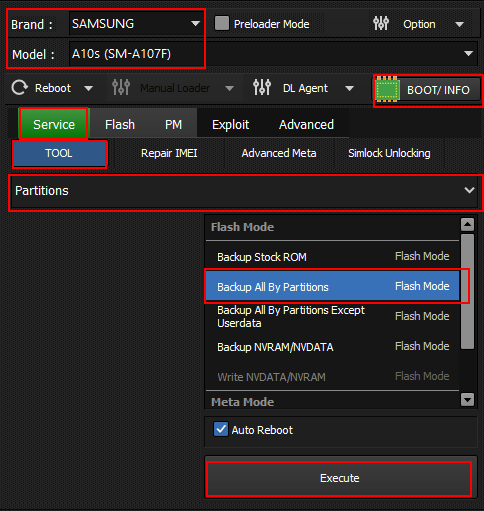
- Run Hydra MTK Module
- Select Model and Brand
- Click Boot Info connect phone with brom/prelaoder mode(Never disconnect phone after boot info)
- Select Tab Service and go to Tool
- Select Partition And Select Backup All By Partition
- Click Execute Button
Navigate back to MediaTek devices or All supported devices