OPPO - Unisoc Devices
PAYJOY REMOVE
- PAYJOY REMOVE
How to remove Payjoy on Oppo Unisoc?
Created: 2026-09-03 12:00:00
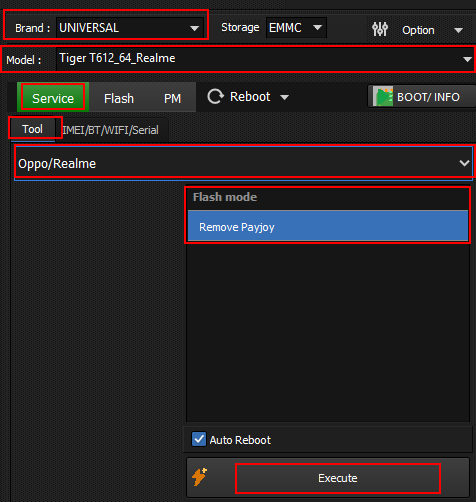
- Open UniSoC module.
- Select UNIVERSAL in brand and respective device CPUID.
- Click bootinfo and connect device. (Hold both volume keys and connect)
- After successful bootinfo.
- Select OPPO from drop down and click Remove Payjoy under advanced mode.
- Click execute and wait for the operation to finish.
Navigate back to Unisoc devices or All supported devices